
 Deutsch
 English
 Türkçe
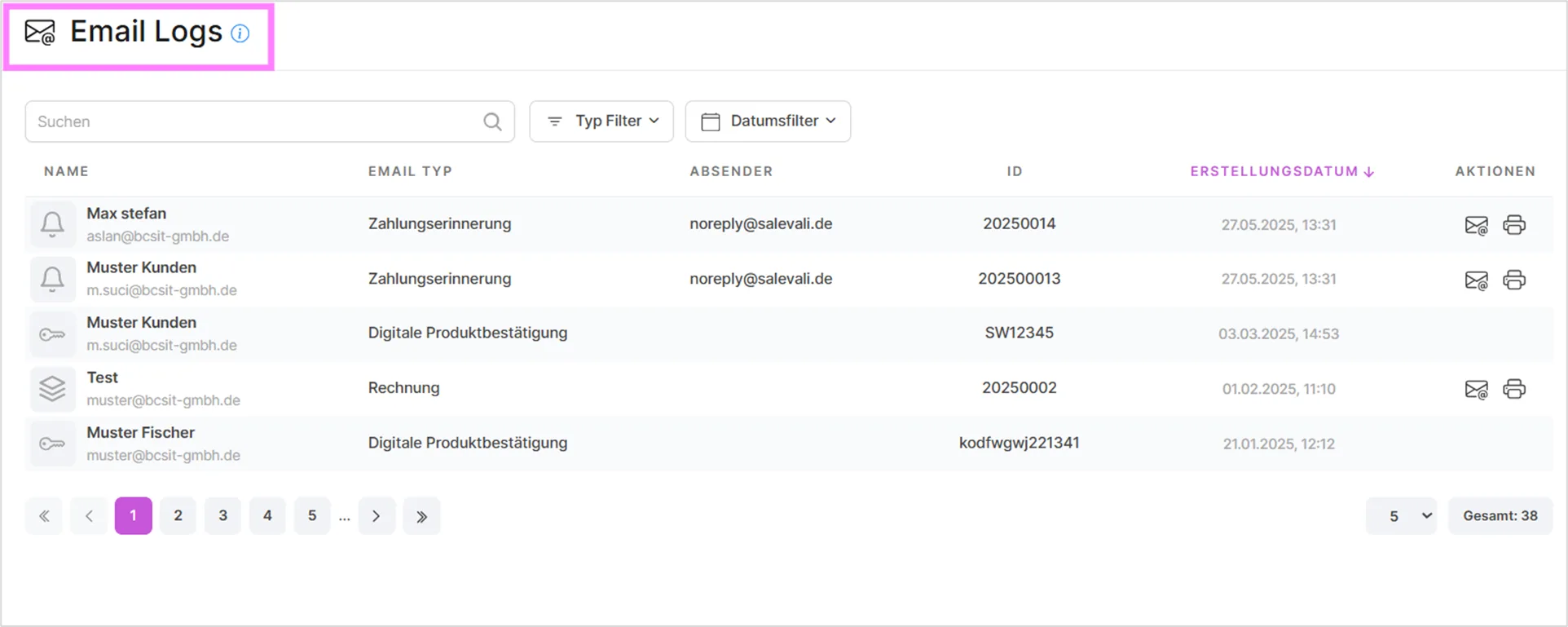
The "Email Logs" section gives you an overview of all emails the system has sent to your customers. Here you can check the delivery status, search for emails, and view details such as the sender, the recipient, and the email type.
You can search by name and email address in the search bar, and use the filter options to filter by log type and by date range for a specific period. In the table you can click on the IDs to be taken to the corresponding document. Using the icons in the actions column, you can resend an email or view the corresponding document.
Summary
At the top of the page, a summary bar shows the total number of emails, the number of email types, and the number of senders for the currently selected filter.
Email types
The type filter lets you narrow the log down to a specific kind of email:
- Order
- Offer
- Invoice
- Waybill
- Credit note
- Payment reminder
- Reminder 1
- Reminder 2
- Return slip
- Digital product confirmation
- Digital product key
- Digital product reservation
- Account cancellation
- Account activation
- Cancellation verification code
- Activation code
Columns
The Sender column shows which mailbox the email was sent from.
Was this article helpful?
Thanks for your feedback!